

Minestom Sunucusu Yapalım

  • Konuyu Başlatan Konuyu Başlatan Kovalski
  • Başlangıç tarihi Başlangıç tarihi
  • Görüntüleme 552
Durum
Üzgünüz bu konu cevaplar için kapatılmıştır...

Kovalski

Elmas Güneş Gibi Parıldıyor
Katılım
17 Kasım 2015
Mesajlar
579
Elmaslar
224
Puan
14.520
Minecraft
Kovalski
Merhabalar, bu konuda minestom ile sunucu yaparken en genel herkesin işine yarayacağını düşündüğüm kodlarımı paylaşacağım.

Bu util sayesinde bukkitten alışık olduğumuz &lMerhaba tarzı stil ve renk kodlarını kullanabilirsiniz, sadece &a &b gibi olanları eklemedim onun yerine &#220022 şeklinde hex kodlarının desteğini ekledim. Bence standart renklerin kullanımından uzaklaşmalıyız isteyen desteğini ekleyebilir tabi.
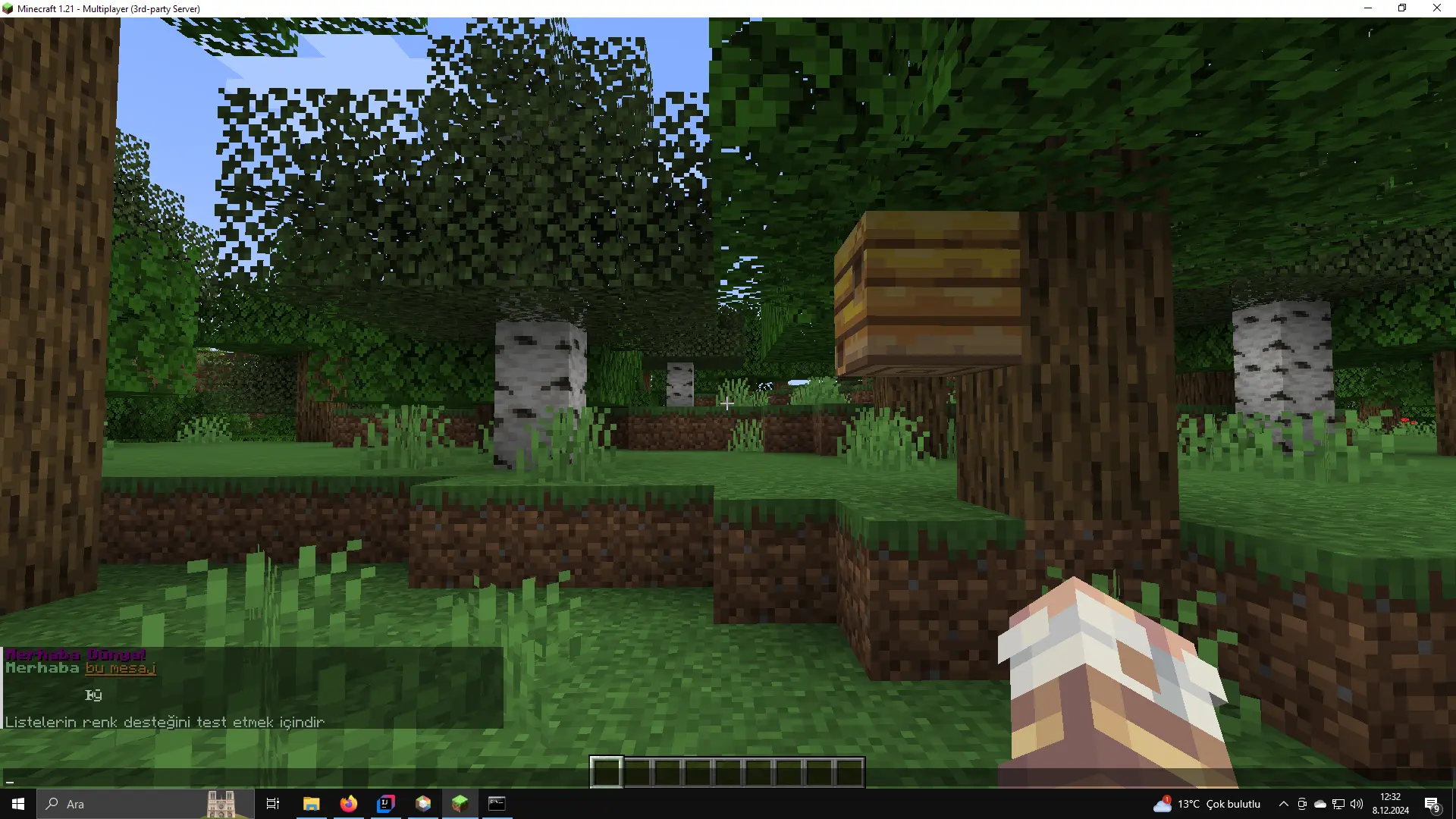
1733650351126.webp


Kod:
import net.kyori.adventure.text.Component;
import net.kyori.adventure.text.format.Style;
import net.kyori.adventure.text.format.TextColor;
import net.kyori.adventure.text.format.TextDecoration;

import java.util.ArrayList;
import java.util.List;
import java.util.regex.Matcher;
import java.util.regex.Pattern;

public class ComponentUtils {

    private ComponentUtils() {
        throw new UnsupportedOperationException("Utility class");
    }

    // Regex to match color codes (HTML color codes: &#RRGGBB)
    private static final Pattern COLOR_CODE_PATTERN = Pattern.compile("&#([A-Fa-f0-9]{6})");

    // Regex to match style codes (e.g., bold, italic, etc.)
    private static final Pattern STYLE_CODE_PATTERN = Pattern.compile("&([a-zA-Z])");


    // Converts a colored string into a list of TextComponent objects
    public static Component toTextComponent(String input) {
        List<Component> components = new ArrayList<>();
        int lastEnd = 0;

        Matcher matcher = Pattern.compile(COLOR_CODE_PATTERN.pattern() + "|" + STYLE_CODE_PATTERN.pattern()).matcher(input);

        Style currentStyle = Style.empty();
        TextColor currentColor = null;

        while (matcher.find()) {
            // Add the plain text before the code
            if (lastEnd != matcher.start()) {
                String plainText = input.substring(lastEnd, matcher.start());
                components.add(Component.text(plainText).style(currentStyle.color(currentColor)));
            }

            if (matcher.group(1) != null) { // Color code
                String hexColor = matcher.group(1);
                int r = Integer.parseInt(hexColor.substring(0, 2), 16);
                int g = Integer.parseInt(hexColor.substring(2, 4), 16);
                int b = Integer.parseInt(hexColor.substring(4, 6), 16);
                currentColor = TextColor.color(r, g, b);
            } else if (matcher.group(2) != null) { // Style code
                char styleCode = matcher.group(2).toLowerCase().charAt(0);
                currentStyle = switch (styleCode) {
                    case 'l' -> currentStyle.decorate(TextDecoration.BOLD); // Bold
                    case 'o' -> currentStyle.decorate(TextDecoration.ITALIC); // Italic
                    case 'n' -> currentStyle.decorate(TextDecoration.UNDERLINED); // Underlined
                    case 'm' -> currentStyle.decorate(TextDecoration.STRIKETHROUGH); // Strikethrough
                    case 'k' -> currentStyle.decorate(TextDecoration.OBFUSCATED); // Obfuscated
                    case 'r' -> Style.empty(); // Reset
                    default -> currentStyle; // Ignore unknown styles
                };
            }

            lastEnd = matcher.end();
        }

        // Add the remaining text
        if (lastEnd < input.length()) {
            components.add(Component.text(input.substring(lastEnd)).style(currentStyle.color(currentColor)));
        }

        // Combine the list of components into one
        return joinComponents(components);
    }

    private static Component joinComponents(List<Component> components) {
        Component result = Component.empty();
        for (Component component : components) {
            result = result.append(component);
        }
        return result;
    }

    // Converts a list of strings with color codes into a single colored TextComponent
    public static Component toTextComponentFromList(List<String> inputs) {
        List<Component> components = new ArrayList<>();

        // Process each string in the list
        for (String input : inputs) {
            // Trim the input to remove leading/trailing spaces
            String trimmedInput = input.trim();

            if (trimmedInput.isEmpty()) {
                // If the string is empty after trimming, add an empty line
                components.add(Component.text(""));  // Add an empty TextComponent for empty line
            } else {
                // Process valid string (with color codes)
                components.add(toTextComponent(input));  // Call toTextComponent for each string
            }
        }

        // Manually add line breaks between components
        Component result = components.getFirst(); // Start with the first component

        for (int i = 1; i < components.size(); i++) {
            result = result.append(Component.text("\n"));  // Add line break
            result = result.append(components.get(i));   // Append next component
        }

        return result;
    }
}

 
Son düzenleme:
Minestom projesi akıyor gibi ellerine sağlık.
 
bu forumda minestom gormeyi hic beklemiyordum
 
bu forumda minestom gormeyi hic beklemiyordum
Sunucular o kadar dolu ve şişmiş durumda ki kusasım geliyor girince, çorba yapıyor herkes.

Minestomun arkasındaki mantık bütün her şeyi çıkaralım fakat geri eklemesi için güzel bir api koyalım ve sunucu mutlthreaded çalışabilsin gibi bir felsefe olduğu için açıkcası sunucuyu sıfırdan yazmak eziyetten ziyade oldukça keyifli bir süreç. Umarım daha fazla kişi minestom için kod yazmaya başlar.

Bütün projemi paylaşmayı düşünmüyorum fakat ara sıra işinize yarayacak mini rehber ve utiller paylaşıcam bu konuda.
 
metodun icerisinde compile ettigin pattern da constant field yapilabilir gibi sanki
 
metodun icerisinde compile ettigin pattern da constant field yapilabilir gibi sanki
idk daha da abartıp kendi placeholder mantığımı da bu utilitye dahil edicem ya da dahada parçalıcam sanırım

Renk, Stil ve Placeholder haricinde başka bir şeyi replace etmeye gerek yok diye biliyorum hepsini birden halletmek istiyorum
 
Yapmış olduğum basit placeholder çözümü

Kod:
import net.minestom.server.entity.Player;

import java.util.HashMap;
import java.util.Map;
import java.util.function.BiFunction;
import java.util.regex.Matcher;
import java.util.regex.Pattern;

public class PlaceholderManager {

    private final Map<String, BiFunction<Player, String, String>> placeholders = new HashMap<>();

    /**
     * Registers a new placeholder with its associated function that accepts player and dynamic placeholder key.
     *
     * @param placeholder the placeholder key (e.g., "player_level")
     * @param function    the function that generates the placeholder's value
     */
    public void registerPlaceholder(String placeholder, BiFunction<Player, String, String> function) {
        placeholders.put(placeholder, function);
    }

    public String resolvePlaceholders(Player player, String text) {
        String result = text;

        for (Map.Entry<String, BiFunction<Player, String, String>> entry : placeholders.entrySet()) {
            String placeholderKey = entry.getKey();
            String staticPlaceholder = "%" + placeholderKey + "%"; // Static placeholder format
            String dynamicRegex = "%" + placeholderKey + "_<(.*?)>%"; // Dynamic placeholder regex

            // Resolve dynamic placeholders only if '<' exists in the text
            if (result.contains("<")) {
                Pattern pattern = Pattern.compile(dynamicRegex);
                Matcher matcher = pattern.matcher(result);

                while (matcher.find()) {
                    String dynamicPart = matcher.group(1); // Get the dynamic part

                    // Recursively resolve placeholders in the dynamic part
                    String resolvedDynamicPart = resolvePlaceholders(player, dynamicPart);

                    String replacement = entry.getValue().apply(player, resolvedDynamicPart);
                    result = result.replace(matcher.group(), replacement);
                }
            }

            // Resolve static placeholders
            if (result.contains(staticPlaceholder)) {
                String replacement = entry.getValue().apply(player, ""); // Pass empty dynamic part
                result = result.replace(staticPlaceholder, replacement);
            }
        }

        return result;
    }
}

Kod:
PlaceholderManager placeholderManager = new PlaceholderManager();


// Placeholderı döndüren fonksiyonu placeholderı atama sırasında yazıyoruz.
placeholderManager.registerPlaceholder("player_name", ((player, s) -> "İsim: "+player.getUsername()+" Veri:"+s));
placeholderManager.registerPlaceholder("test", ((player, s) -> "YOU CAN'T"));

// Temel placeholder
sender.sendMessage(ComponentUtils.toTextComponent(Main.getPlaceholderManager().resolvePlaceholders((Player) sender, "%player_name%")));

// Değişkene sahip placeholder
sender.sendMessage(ComponentUtils.toTextComponent(Main.getPlaceholderManager().resolvePlaceholders((Player) sender, "%player_name_<I'd win>%")));

// İç içe placeholder
sender.sendMessage(ComponentUtils.toTextComponent(Main.getPlaceholderManager().resolvePlaceholders((Player) sender, "%player_name_<%test%>%")));

Önce placeholderları ayıklayıp sonra renklendirdiğim kod şimdiden korkunç duruyor ona bir şeyler uydurmak lazım.

Kodun bir kısıtlaması var <> en sonda olmalı ve sadece bir tane olabilir. (daha fazlasına gerek olacağı bir durum aklıma gelmedi)


1733685554175.webp
 
Son düzenleme:
Java:
public class PlayerChatListener implements EventListener<PlayerChatEvent> {

    private final SimpleDateFormat sdf;

    public PlayerChatListener() {
        this.sdf = new SimpleDateFormat("dd/MM/yyyy HH:mm:ss");
    }

    @Override
    public @NotNull Class<PlayerChatEvent> eventType() {
        return PlayerChatEvent.class;
    }

    @Override
    public EventListener.Result run(PlayerChatEvent event) {
        Player player = event.getPlayer();
        String message = event.getMessage();
        event.setChatFormat(player1 ->
                MiniMessage.miniMessage().deserialize(ConfigData.get("config").getString("chat-format"),
                        Placeholder.parsed("<message>", message),
                        Placeholder.parsed("<username>", player.getUsername()),
                        Placeholder.parsed("<rank>", PlayerData.get(player).getRank().getPrefix()))
        ));
        System.out.println("[" + sdf.format(new Date()) + "] [Sohbet] [" + player.getUsername() + "] " + message);
        return EventListener.Result.SUCCESS;
    }
}

buda benden olsun
.parsed() güzel kullanım şekliymiş, korkunç fonksiyon isimlerimi daha işe yarar şeylerle değiştirmem lazım iyice karışmadan :D

spigot.yml paper.yml gibi benim de mss.yml'ım var (minestomserver bruh) bu classla erişiyorum baya ilkel

Kod:
import org.yaml.snakeyaml.Yaml;

import java.io.InputStream;
import java.util.List;
import java.util.Map;

public class ConfigUtils {

    private Map<String, Object> configData;

    /**
     * Creates the ConfigUtil class and loads the given resource file.
     *
     * @param resourcePath The path of the resource file (e.g., "messages.yml").
     */
    public ConfigUtils(String resourcePath) {
        loadConfig(resourcePath);
    }

    /**
     * Loads the given resource file.
     *
     * @param resourcePath The path of the resource file.
     */
    @SuppressWarnings("unchecked")
    private void loadConfig(String resourcePath) {
        try (InputStream inputStream = getClass().getClassLoader().getResourceAsStream(resourcePath)) {
            if (inputStream == null) {
                throw new RuntimeException("Config file not found: " + resourcePath);
            }
            Yaml yaml = new Yaml();
            configData = yaml.load(inputStream);
        } catch (Exception e) {
            throw new RuntimeException("Error loading config file: " + resourcePath, e);
        }
    }

    /**
     * Retrieves the value associated with a key from the config.
     *
     * @param key The key for the desired value.
     * @return The value associated with the key, or null if not found.
     */
    public Object get(String key) {
        return configData != null ? configData.get(key) : null;
    }

    /**
     * Retrieves the string value associated with a key from the config.
     *
     * @param key The key for the desired string value.
     * @return The string value associated with the key, or null if not found.
     */
    public String getString(String key) {
        Object value = get(key);
        return value instanceof String ? (String) value : null;
    }

    /**
     * Retrieves a nested value from the config using dot notation.
     * For example, you can read a key like "messages.greeting".
     *
     * @param key The key for the nested value using dot notation.
     * @return The nested value, or null if not found.
     */
    public Object getNested(String key) {
        if (configData == null || key == null || key.isEmpty()) {
            return null;
        }

        String[] parts = key.split("\\.");
        Map<String, Object> currentMap = configData;
        Object value = null;

        for (String part : parts) {
            value = currentMap.get(part);
            if (value instanceof Map) {
                currentMap = (Map<String, Object>) value;
            } else {
                break;
            }
        }

        return value;
    }

    /**
     * Retrieves the string value from a nested key using dot notation.
     *
     * @param key The nested key using dot notation.
     * @return The string value associated with the nested key, or null if not found.
     */
    public String getNestedString(String key) {
        Object value = getNested(key);
        return value instanceof String ? (String) value : null;
    }

    /**
     * Retrieves a list of strings from the config.
     *
     * @param key The key for the list of strings.
     * @return A list of strings associated with the key, or null if not found.
     */
    public List<String> getStringList(String key) {
        Object value = get(key);
        if (value instanceof List<?>) {
            // Check if the list contains only strings
            for (Object item : (List<?>) value) {
                if (!(item instanceof String)) {
                    return null; // Return null if any item in the list is not a string
                }
            }
            return (List<String>) value;
        }
        return null;
    }
}
 
Son düzenleme:
Vallah ben bu şekilde aklımda tutuyorum o yüzden ConfigData kullanıyorum
minestomda ConfigData diye bir class olmadığı için belki birine lazım olur diye attım, benimkinin adı ConfigUtils tabi
 
Son düzenleme:
Minestom ile komut yazmayı öğrenmek isteyenler için gamemode komutu örneği yazdım.

Bu komutla sadece kendi oyun modunuzu değiştirebiliyorsunuz. Yorum satırlarını okuyup mantığı çözdükten sonra diğer oyuncular için de çalışacak halini siz yazın.

Argüman terimi belki yabancı gelmiştir onu arg-1 arg-2 gibi düşünün daha tanıdık gelecektir.
/gamemode arg-1 arg-2 gibi

benim syntaxım /gamemode arg-1 şeklinde çünkü kod addSyntax((sender, context) -> {}, gamemode) şeklinde yazılmış

başka bir oyuncunun gamemode'unu değiştirmek için iki argümanlı yeni bir syntax eklenmeli addSyntax((sender, context) -> {}, gamemode, targetPlayer)

Bu desteği yazarken daha bir çok şeyi öğrenmeniz gerekecek mesela Bukkit.getPlayer() yok, onun yerine EntityFinder kullanmalısınız.
Kütüphane, javadocs, kaynak kodu vb. okumanız gerekebilir.
Değerli ziyaretçimiz, içeriği görebilmek için şimdi giriş yapın veya kayıt olun.

Kod:
package org.example.Commands;

import net.kyori.adventure.text.Component;
import net.kyori.adventure.text.format.NamedTextColor;
import net.minestom.server.command.builder.Command;
import net.minestom.server.command.builder.arguments.ArgumentEnum;
import net.minestom.server.command.builder.arguments.ArgumentType;
import net.minestom.server.entity.GameMode;
import net.minestom.server.entity.Player;

public class GamemodeCommand extends Command {

    // Constructor to set up the command
    public GamemodeCommand() {
        super("gamemode", "gm"); // Registering the command with aliases "gamemode" and "gm"
 
        // Setting the permission condition for the command
        setCondition((sender, commandString) -> {
            if (sender.hasPermission("server.gamemode")) { // Check if sender has the required permission
                return true; // Allow command execution
            } else {
                sender.sendMessage(Component.text("You don't have permission to use this command.", NamedTextColor.RED)); // Inform the sender of lack of permission
                return false; // Deny command execution
            }
        });

        // Defining the gamemode argument which is an enum of GameMode
        // This creates an argument named "gamemode" that expects one of the values in the GameMode enum
        ArgumentEnum<GameMode> gamemode = ArgumentType.Enum("gamemode", GameMode.class)
                .setFormat(ArgumentEnum.Format.LOWER_CASED); // Allowing lower-cased input for the enum

        // Setting a default executor to show command usage if no valid arguments are provided
        setDefaultExecutor((sender, commandContext) -> sender.sendMessage("Usage: /" + commandContext.getCommandName()));

        // Adding a syntax to the command to handle the gamemode argument
        addSyntax((sender, context) -> {
            if (!(sender instanceof Player playerSender)) { // Check if sender is a player
                sender.sendMessage(Component.text("Please run this command in-game.", NamedTextColor.RED)); // Inform non-player senders
                return;
            }

            GameMode mode = context.get(gamemode); // Retrieving the game mode from the argument context

            // Changing the sender's game mode
            executeSelf(playerSender, mode);
        }, gamemode); // Associating the gamemode argument with this command syntax, which also enables tab completion

        // **Tab Completion Explanation**:
        // The "gamemode" argument is used in the command and automatically enables tab completion.
        // When a user types "/gamemode" and presses the TAB key, the server will show suggestions for valid game modes
        // based on the enum GameMode (e.g., "survival", "creative", "adventure").
        // Minestom automatically handles the completion of enum arguments, so users can easily select the correct value.
    }

    // Method to apply the selected game mode to the player
    private void executeSelf(Player sender, GameMode mode) {
        sender.setGameMode(mode); // Set the player's game mode to the selected one
    }
}
 
Son düzenleme:
Değerli ziyaretçimiz, içeriği görebilmek için şimdi giriş yapın veya kayıt olun.
burda var
Bir çok şey var orada, ben de oradan öğrendim zaten.

Fakat o attığındaki permission check baya dandik, benim yazdığım setCondition()'dan faydalanıyor.

Bu baya sağlam bir perm check yöntemi eğer oyuncunun yetkisi yoksa komuta erişemiyor bile, tab complete görünmüyor
 
Bu yazımı minestom ile ilgili öğrendiğimiz yeni şeylerden ötürü sildim.

Dünyaların yüklenmesi, kaydedilmesi ve minestom'un sahip olduğu özelliklerin efektif kullanılması ile ilgili yeni bir konu yazıcam yakında.
 
Son düzenleme:
Eğer sunucunuz için bir harita eklemek istiyorsanız worldeditli bir bukkit tabanlı sunucuda hazırlayıp regionlarını minestom sunucunuza aktarın.
Minestom blok yerleşimlerini default olarak handle etmiyor. Normalde bir blok koyduğunuzda o bloğun nasıl yerleştirileceğini hesaplamak için bir handler yazmanız gerekiyor.

Mesela oyuncunun bakış açısına, koyduğu açıya göre bloğun hangi yüzünün hangi tarafa bakacağına sunucu karar veriyor. (olması gerekende bu clientlere güvenirseniz hileler havada uçar)

Sırf harita inşa etmek için vanilladaki bütün blokların yerleşimini handle etmek anlamsız bir çaba olur. Mesela ben boxpvp sunucu yapıyorsam durduk yere bunları handle etmeme gerek olmaz boşuna sunucuya yük olur sadece.
 
Velocity ile proxy yapıldığında viaversion yardımıyla minestom sunucularına çoğu sürümle giriş yapabiliyormuşuz fakat bedrock desteği bayağı sıkıntılı.
 
Durum
Üzgünüz bu konu cevaplar için kapatılmıştır...

Hala Discord sunucumuza katılmadın mı?

Büyük bir topluluğun parçası ol, etkinliklere katıl ve özel hediyeler kazanma şansı yakala!

Şimdi Katıl
Üst