


Mustafa Özcan
Bir Kömür Göründü Kaptanım!
Merhabalar Ben MustafaTR.
Bugün sizlere sunucumda şuanda bile
kullanmış olduğum
tamamen kendim haızrladığım
FeatherBoard Configini
paylaşıyorum.
FeatherBoardın 1.8 sürümünde sıkıntısız çalışıyor.
Herkez istediği gibi editleyip düzenlensin!
Kullanacak kişiler lütfen bir beğeni bıraksınlar!
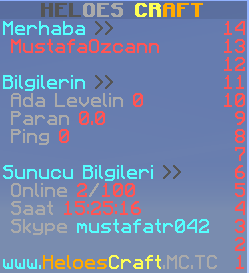
HASTEBIN :
KOD OLARAK :
kullanmış olduğum
tamamen kendim haızrladığım
FeatherBoard Configini
paylaşıyorum.
FeatherBoardın 1.8 sürümünde sıkıntısız çalışıyor.
Herkez istediği gibi editleyip düzenlensin!
Kullanacak kişiler lütfen bir beğeni bıraksınlar!
HASTEBIN :
Değerli ziyaretçimiz, içeriği görebilmek için
şimdi giriş yapın veya kayıt olun.
KOD OLARAK :
Kod:
# ------------------------------ #
#
#  FeatherBoard 1.9.0
#  Runs like a feather on your server
#  (c) Maxim Van de Wynckel
#
# ------------------------------ #

# Permissions: To use the action groups give them the permission
#              featherboard.group.<group>
#              Make sure to remove them from the other groups
#              when giving a new permission.

# Variables: These variables can be used in the TEXT section
#            of both the header as the footer.
#
#            {PLAYER}       - Player name
#            {PLAYERNICK}   - Player nickname
#            {SERVER}       - Server name
#            {PLAYERCOUNT}  - Server player count
#            {BUNGEECOUNT}  - Bungee network player count
#            850+ more ... see spigot page

# Formatting: These are formatting tags allowing you to format the animations
#             or placeholders.
#
#             Substring: This allows you to split a word (even a placeholder) in parts
#               example: <substring begin=0 end=3>Hello World</substring> = Hel
#               usage: This can be used to split placeholders when creating a typewriter
#                      or to split the colors in a placeholder.
#
#             Scroll: This creates a scrolling animation of the text inside it. It accepts
#                     two arguments (the length and space between scrolls).
#               example: <scroll width=20 spaces=20>&2This is a &atest</scroll>
#
#             PLENTY MORE! See spigot page

#~~~~~~~~~~~~~~~~~~~~~~~~~~~~~~~~~~~~~~~~~~~#
# GENERAL PLUGIN SETTINGS
#~~~~~~~~~~~~~~~~~~~~~~~~~~~~~~~~~~~~~~~~~~~#

## Config version (DO NOT EDIT)
config: 1

## Language file
lang: 'en'

## Debug mode
debug: false

## Log to file
log: true

## Update checking
update:
  check: true # RECOMMENDED YOU LEAVE THIS TRUE

#~~~~~~~~~~~~~~~~~~~~~~~~~~~~~~~~~~~~~~~~~~~#
# PLUGIN SPECIFIC SETTINGS
#~~~~~~~~~~~~~~~~~~~~~~~~~~~~~~~~~~~~~~~~~~~#

# Tweaks to increase performance (Use at own risk)
tweaks:
  # This option does not send scoreboard remove packets
  # to the client on quit. This can increase performance on servers
  # where players quit a lot (hubs, ...)
  #
  # Removal of the plugin requires you to manually delete the scoreboard.dat in the worlds
  # /data folder
  #
  # Enabling this can cause the scoreboard not to work anymore. Use at your own risk
  keepScoreboardOnQuit: false


# Anti Flicker will use a new engine that will allow you to use fast animations
# without any flicker. This is an EXPERIMENTAL feature and it asked to post bugs
# and problems that only occur with this option enabled in a Spigot private message.
# Using this option shortens the maximum length for 1.8 servers to around 26~28 chars
# but this is an increase for 1.7 clients (that default only have 16 characters)
# IF YOU ARE HAVING PROBLEMS. TRY TO TURN THIS OFF FIRST
antiflicker: true

# A list of different scoreboards
boards:
  default:
    title: # The first element in the group will be title.
      # We will show the server name animated, with a glow effect every 20 sec
      text:
      - ' <delay times=3>&7&lHELOES &6&lCRAFT</delay> '
      - ' <delay times=3>&8&lH&7&lELOES &e&lC&6&lRAFT</delay> '
      - ' <delay times=3>&8&lHE&7&lLOES &e&lCR&6&lAFT</delay> '
      - ' <delay times=3>&8&lHEL&7&lOES &e&lCRA&6&lFT</delay> '
      - ' <delay times=3>&8&lHELO&7&lES &e&lCRAF&6&lT</delay> '
      - ' <delay times=3>&8&lHELOE&7&lS &e&lCRAFT</delay> '
      - ' <delay times=3>&8&lHELOES &e&lCRAFT</delay> '
      - ' <delay times=3>&8&lHELOE&7&lS &e&lCRAF&6&lT</delay> '
      - ' <delay times=3>&8&lHELO&7&lES &e&lCRA&6&lFT</delay> '
      - ' <delay times=3>&8&lHEL&7&lOES &e&lCR&6&lAFT</delay> '
      - ' <delay times=3>&8&lHE&7&lLOES &e&lC&6&lRAFT</delay> '
      - ' <delay times=3>&8&lH&7&lELOES &e&lC&6&lRAFT</delay> '


      # Interval the animation loops in ticks (20 ticks = 1 sec)
      # If you need waiting intervals look at the DELAY placeholder
      interval: 3
      # Do you want to randomize the animation frames?
      random: false
    header: # A header is recommended to make sure the scoreboard remains the same size
      text:
      - '&bMerhaba &8>>'
      interval: 100
      random: false
    player-label: # You can add elements to the group and name them like you want
      # Lets make a static label
      text:
      - ' &c{PLAYER}'
      interval: 1 # The interval is not important since its just 1 static text.
      # Do you want to randomize the animation frames?
      random: false
    spacer-player: # This is a spacer an empty line
      text:
      - ''
      interval: 100
      # Do you want to randomize the animation frames?
      random: false
    news-label:
      text:
      - '&bBilgilerin &8>>'
      interval: 100
      # Do you want to randomize the animation frames?
      random: false
    news:
      # Lets create some animated news
      # News is something you need to write quick
      # and usually you don't want to spend ages on creating
      # some cool effect. That is why FeatherBoard features
      # several presets you can use.
      text:
      - ' &7Ada Levelin &c{askyblock_island_level}'
    moneytimesplayed-label: #Switch between site, times played and health
      text:
      - ' &7Paran &c{money}'
      interval: 100
      random: false
    moneytimesplayed: #Switch between site, times played and health
      text:
      - ' &7Ping &c{ping}'
      interval: 100
      random: false
    deneme-label: #deneme
      text:
      - ''
      interval: 100
      # Do you want to randomize the animation frames?
      random: false
    spacer-money: # Another spacer (empty line) again you don't need to call this 'spacer'
      text:
      - '&bSunucu Bilgileri &8>>'
      interval: 100
      random: false
    server-label: # Server status label
      text:
      - ' &7Online &c{onlineplayers}&7/&c100'
      interval: 100
      random: false
    spacer-para: # Another spacer (empty line) again you don't need to call this 'spacers'
      text:
      - ' &7Saat &c{time}'
      interval: 100
      random: false
    spacer-parapara: # Another spacer (empty line) again you don't need to call this 'spacers'
      text:
      - ' &7Skype &bmustafatr042'
      interval: 100
      random: false
    spacer-paraparapara: # Another spacer (empty line) again you don't need to call this 'spacers'
      text:
      - ' '
      interval: 100
      random: false
    website: # Website
      text:
      - '&bwww.&6Heloes&eCraft&7.MC.TC'
      interval: 100
      random: false